
STEP and DXF to Finished Parts: Data Checklist
A supplier cannot reliably manufacture a custom part from a filename alone. Moving from engineering data to finished metal components requires several files and commercial instructions to agree: the 3D model defines form, the 2D cut file defines flat geometry, the drawing defines acceptance requirements, and the RFQ defines quantity, delivery and documentation scope.
When those sources conflict, the machine does not know which one represents design intent. The result is usually a clarification loop, a quotation based on assumptions, or a part that is geometrically correct in one file but unacceptable under another. A controlled manufacturing data package makes the intended product, process route and inspection plan easier to understand before production begins.
Why a Manufacturing Data Package Matters
Modern fabrication combines automated CAD/CAM with process knowledge. Software can import geometry, create nests and generate toolpaths, but it cannot safely infer whether a visible line is a bend reference, whether a hole is clearance or threaded, or whether a cosmetic surface must follow a grain direction. Those decisions belong in controlled engineering information.
A structured package also lets engineering and DFM support identify manufacturability issues before material is ordered. Tight inside radii, inaccessible welds, small laser-cut features, coating allowances and inspection datums can then be discussed while changes are still inexpensive.
PVD vs Electroplating: At-a-Glance
File or record | Primary role | It should contain | It should not be trusted for |
|---|---|---|---|
STEP model | 3D product definition | Formed geometry, interfaces and assembly context | Unstated tolerances or process notes |
DXF file | 2D manufacturing geometry | Nominal closed profiles, holes and approved reference layers | Material, finish or acceptance criteria |
PDF drawing | Controlled requirements | Dimensions, tolerances, datums, notes and revision | Machine-ready contours |
BOM / part list | Configuration control | Part numbers, quantities, materials and hierarchy | Detailed geometry |
RFQ / PO data | Commercial scope | Volumes, delivery, certificates and packaging | Design definition |
Inspection plan | Verification method | Critical characteristics, sampling and records | Replacing the released drawing |
1. Start with a Controlled Part and Revision List
Create a simple index before checking geometry. Each unique part should have a part number, description, revision and required quantity. The filenames for STEP, DXF and PDF should connect clearly to that identity. If the order includes an assembly, show which components are manufactured, which are purchased and which are reference-only.
Remove superseded files from the transmittal. Sending REV-A, REV-B and REV-C in the same folder invites the supplier to make a choice that belongs to the design authority. If a file is replaced after quotation, issue a new revision and summarize what changed so pricing, programs and inspection records can be updated deliberately.

2. Use STEP for Formed Geometry and Assembly Context
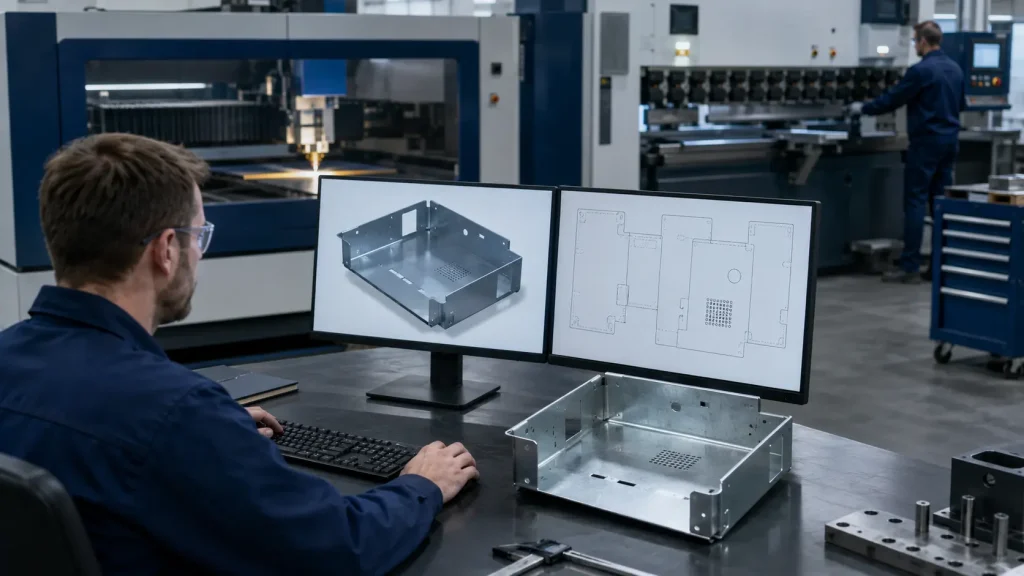
STEP is a neutral 3D exchange format that helps the supplier understand the finished form, mating interfaces and assembly relationships. It is especially valuable for bent sheet metal, machined features, welded fabrications and components whose flat geometry does not reveal the final shape.
Export solid bodies at the correct scale and include only the intended product definition. Suppress fixtures, duplicate bodies and unrelated reference equipment unless they are deliberately included for interface review. Confirm that the supplier can identify individual parts and that the model opens without missing external references.
For bent components, the formed model supports tooling and bend-sequence review for press brake bending. It does not automatically define the approved bend deduction, general tolerance or cosmetic face; those items should remain in the drawing or project specification.
3. Use DXF for Clean 2D Cutting Geometry
A DXF used for sheet metal laser cutting should normally contain nominal 1:1 part geometry with declared units, closed contours and no duplicates. Remove dimensions, title blocks, hatches, hidden construction objects and pre-nested sheets unless the receiving workflow specifically requests them.
Keep cut geometry separate from bend references and marking paths. Do not add kerf compensation unless agreed; the fabricator normally applies machine- and material-specific compensation in CAM. Reopen the exported file in a neutral viewer and measure at least one overall dimension and one critical feature.
4. Let the PDF Drawing Define Acceptance
The drawing should state the requirements used to accept the finished part: controlled dimensions, tolerances, datums, material grade, thickness, surface finish, weld notes, coating, edge condition and revision. A drawing that merely repeats every model dimension can obscure what is truly critical; emphasize functional and inspection-relevant characteristics.
State whether the drawing or model governs if a conflict occurs. Model-based definition may be appropriate in a controlled digital workflow, but a STEP file by itself does not carry every semantic requirement reliably between systems. For most mixed-supplier workflows, a clear PDF remains the practical contractual reference.
5. Cross-Check STEP, DXF and PDF Geometry
The three files must describe the same revision of the same part. Compare overall length and width, hole count, major cutouts, bend positions, formed height and part orientation. If the DXF is supplier-generated from the formed model, define who approves the flat pattern and how changes are returned.
- Geometry check: hole locations, cutouts and external profile agree across formats.
- Revision check: part number and revision are identical in filenames, drawing title block and BOM.
- Orientation check: handed parts, cosmetic faces and grain direction cannot be mirrored accidentally.
- Authority check: the package identifies which record controls dimensional acceptance.
6. Specify Material Completely
Material information should include grade, product form, thickness, applicable standard and permitted substitutions. Requirements for stainless steel fabrication may also need surface finish, protective film, directional grain and contamination controls.
Avoid descriptions such as “steel,” “aluminum” or “stainless” without a grade. Different grades affect strength, forming behavior, weldability, corrosion performance, availability and price. If a substitute is acceptable, define the approval process rather than leaving equivalence to interpretation.

7. Define Downstream Manufacturing Requirements
A cut profile is often only the first operation. The data package should show the complete route: deburring, bending, machining, hardware insertion, welding, grinding, coating, assembly and packaging. This lets the supplier plan datum transfer and protect critical surfaces throughout production.
Identify joint type, weld symbols, quality level and finish expectations for professional welding services. For electrostatic powder coating, specify color standard, texture or gloss, masked areas, threaded-hole protection and any appearance sample. Coating thickness may matter at fits, grounding points and captive hardware.
8. Separate General Tolerances from Critical Dimensions
Apply a realistic general tolerance for non-critical features and identify the smaller group of dimensions that control fit, function or safety. A blanket tight tolerance increases inspection and process cost without necessarily improving the assembly. Critical dimensions should have clear datums, measurable definitions and an agreed inspection method.
If profile tolerance applies after bending, welding or coating, say so. Process sequence changes what can be measured and controlled. A hole position achievable in a flat laser-cut blank may move after forming or weld distortion; the drawing should define the condition in which acceptance is required.
9. Add Quantity, Forecast and Delivery Information
Pricing depends on more than geometry. State prototype quantity, initial batch, expected repeat volume, annual demand and delivery pattern. This information affects material purchasing, nesting, setup allocation, tooling decisions, subcontracted finishing and packaging. A one-piece prototype and a recurring annual demand of 10,000 parts may use different production routes even when the design is identical.
10. Define Quality Records Before Quotation
List required material certificates, first-article inspection, dimensional reports, coating certificates, weld documentation, traceability and retention periods in the RFQ. Nova’s quality and project approach can then align inspection effort with the actual risk and drawing requirements rather than adding documentation after production has started.
For first articles, define whether every drawing characteristic must be reported or only selected critical features. Agree on sampling for repeat batches and identify any special gauges or functional checks. Documentation has real cost and lead-time impact, so it belongs in the quotation scope.
Manufacturing Data Release Checklist
Release check | Acceptance condition | Risk if missing |
|---|---|---|
Part identity | Unique part number, description and revision | Wrong configuration |
STEP model | Opens correctly; formed geometry confirmed | Lost assembly or forming intent |
DXF geometry | 1:1, declared units, closed clean contours | CAM cleanup or incorrect cut |
PDF drawing | Tolerances, datums, notes and authority stated | Ambiguous acceptance |
Cross-file match | Major features and revision agree | Conflicting production data |
Material | Grade, standard, thickness and substitutions defined | Cost or performance change |
Finish | Color, texture, cosmetic faces and masking defined | Appearance or fit failure |
Process scope | Forming, welding, hardware and assembly listed | Incomplete quotation |
Commercial data | Quantities, forecast and delivery stated | Non-comparable pricing |
Quality data | Certificates, FAI and inspection records stated | Late documentation delay |

A Practical Preflight Workflow
- Freeze the revision: Confirm approval status and remove obsolete data.
- Open every file: Do not rely on filenames or thumbnails; confirm that each file is readable.
- Compare formats: Check major dimensions, holes, bends, orientation and revision across STEP, DXF and PDF.
- Review manufacturing notes: Confirm material, finish, process route, tolerances and inspection scope.
- Package one controlled set: Use a concise transmittal or file index and state which record governs.
- Capture supplier questions: Convert recurring clarification points into future export or drawing rules.
Frequently Asked Questions
Is a STEP file enough to manufacture a part?
Usually not. STEP communicates 3D geometry well, but tolerances, finishes, material requirements, inspection criteria and commercial scope normally require a controlled drawing and RFQ information.
Should the customer or supplier create the flat-pattern DXF?
Either approach can work. The responsibility, bend allowance method and approval route must be agreed. When the supplier creates the flat pattern, the released formed model and drawing should remain the design authority.
What happens if the DXF and PDF drawing disagree?
Production should pause for clarification. The package should identify the controlling document, but an obvious conflict still needs formal resolution and usually a corrected revision.
Should every part have a separate file?
Normally yes. One clearly named file per unique part simplifies quoting, revision control and automation. Assemblies may also include a master STEP model and BOM for context.
Do I need to send native CAD files?
Not always. Neutral STEP, DXF and PDF files are widely usable and reduce software dependency. Native files may help complex collaboration, but they should not replace a controlled neutral release package.
Example: A Controlled Release Package
For a small welded and powder-coated enclosure, a practical release might contain one assembly STEP model, one STEP model and one approved DXF for each unique sheet-metal component, a dimensioned PDF drawing for each part, an assembly drawing, a BOM and a short RFQ transmittal. The folder does not need elaborate software or a complicated naming convention; it needs an obvious relationship between every file and the released configuration.
- Part files: ENC-101_REV-C.step, ENC-101_REV-C.dxf and ENC-101_REV-C.pdf describe the same component.
- Assembly context: ENC-100_REV-C_ASSEMBLY.step and the assembly PDF show orientation, hardware and weld relationships.
- Commercial scope: the RFQ lists batch quantity, annual demand, delivery location, finish and required records.
- Authority statement: the transmittal identifies the released drawing as the acceptance reference and names the approved flat-pattern source.
If engineering changes a hole pattern after quotation, issue REV-D for the affected part and any dependent assembly records. The change note should identify the altered feature and whether existing material, tooling or work in progress may still be used. Do not silently replace REV-C files under the old names. A concise change description helps the supplier determine whether the quotation, CAM program, inspection report or delivery plan must be revised.
After award, retain the exact released package with the purchase order and supplier acknowledgements. Questions and approved deviations should be linked to that baseline. This creates a traceable record for repeat orders and prevents an informal email attachment from becoming an uncontrolled production master.
Better Data Creates a Shorter Path to Finished Parts
A strong manufacturing package does not contain the greatest possible number of files. It contains the smallest controlled set that communicates geometry, requirements, configuration and commercial scope without contradiction. STEP, DXF and PDF each solve a different part of that problem; their value comes from agreement.
For a manufacturability review or comparable quotation, request a project quote with the current STEP models, DXF profiles, PDF drawings, part list, quantities and downstream process requirements.